
Multiplayer gaming has become one of the most popular ways for people to enjoy video games. Instead of playing alone against computer-controlled characters, players can connect with friends, family members, or other people worldwide. From competitive sports simulations to adventure games and battle arenas, multiplayer experiences allow people to share challenges, work together, and compete against one another.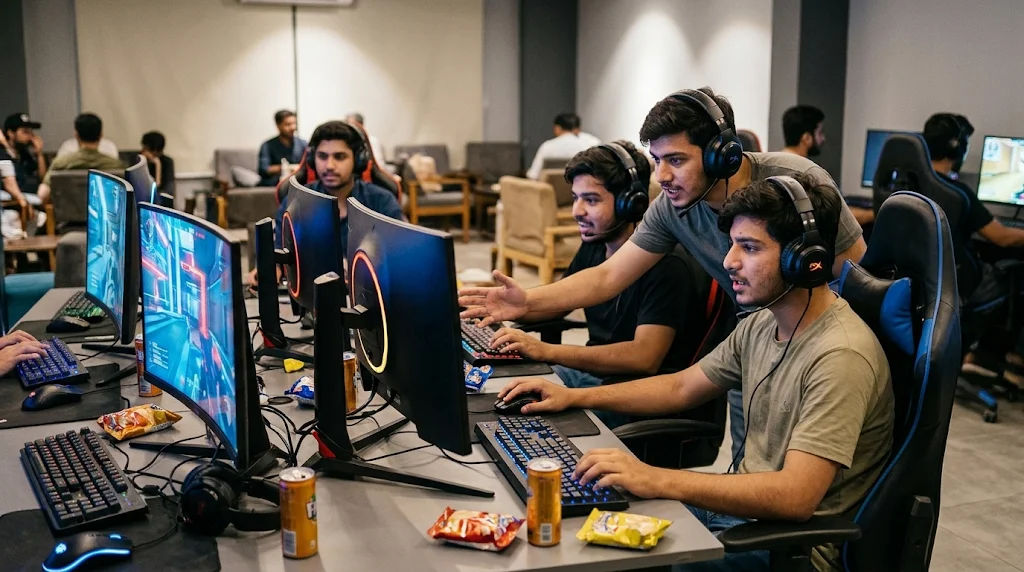
The technology behind multiplayer gaming is more interesting than it might initially appear. Players need a way to connect their devices, communicate information, and keep the game running smoothly for everyone. Modern online games use internet connections, dedicated servers, matchmaking systems, and synchronization technology to create shared gaming experiences. These systems work together to make players feel as though they are participating in the same virtual environment, even when they are physically far apart.
Understanding how multiplayer gaming works helps explain why these experiences have become so popular. It also makes it easier to understand different multiplayer modes, internet requirements, gaming servers, communication features, and the technology responsible for connecting players.
What Is Multiplayer Gaming?
Multiplayer gaming refers to a gaming experience where two or more people participate in the same game. Players may compete against each other, cooperate to complete objectives, or explore a shared virtual world.
Unlike single-player games, which usually involve one human player interacting with the game's programmed environment, multiplayer experiences involve communication between multiple players or gaming devices.
For example, a football game might allow two friends to control different teams. A racing game could connect several players in the same competition. Similarly, an adventure game might allow a group to complete missions together.
Multiplayer gaming can happen through different technologies, including local connections, home networks, and the internet.
The Main Purpose of Multiplayer Gaming
The primary purpose is to create shared entertainment experiences. Players can test their skills, develop strategies, communicate, and enjoy challenges together.
Some games emphasize teamwork, while others focus on individual performance. Both approaches give players opportunities to interact with people rather than playing against artificial intelligence alone.
How It Differs From Single-Player Gaming
Single-player games generally process gameplay on one device. The game responds to the player's actions without needing to coordinate with other human participants.
Multiplayer gaming requires additional systems. These systems exchange information about player movements, actions, scores, and game events.
This additional communication makes multiplayer experiences more complex but also creates opportunities for social interaction and competition.
How Does Multiplayer Gaming Actually Work?
Multiplayer gaming depends on communication between gaming devices. When players join the same match, their devices must exchange information so everyone experiences a consistent version of the game.
This process involves several important stages.
1. Connecting Players
The first step is establishing a connection between players.
When someone opens a multiplayer game, the software checks whether an internet or local network connection is available. The player may then sign in to a gaming account or choose a guest profile.
The game searches for available matches, friends, or multiplayer sessions.
Once players join the same session, the system establishes the necessary communication channels.
2. Sending Player Actions
During gameplay, every player performs different actions.
These might include moving a character, jumping, selecting an item, driving a vehicle, or interacting with another character.
The gaming device sends information about these actions to the server or other connected devices.
For example, when a player moves forward in a racing game, the system communicates that movement so the other participants can see the vehicle changing position.
3. Processing Game Information
A multiplayer game needs to process information from different participants.
Depending on its design, the game server or another controlling device calculates important events. These may include movement, collisions, scores, completed objectives, and match results.
The updated information is then distributed to connected players.
This allows everyone to experience the same general sequence of events.
4. Synchronizing Gameplay
Synchronization is essential because different players may have different internet speeds, hardware performance, and connection quality.
The game must keep everyone's experience reasonably consistent.
For example, if one player scores a point, the other players should see that result without significant delay.
Developers use synchronization methods, prediction systems, and network adjustments to reduce differences between players' screens.
Multiplayer Gaming Servers
Servers are among the most important components of OPEN88multiplayer gaming.
A server is a computer system that receives information from connected players, processes relevant game events, and sends updated information back to participants.
Many large multiplayer games use dedicated servers because they can manage numerous players more reliably than an ordinary personal computer.
What Is a Dedicated Server?
A dedicated server is a computer or hosted system specifically assigned to manage multiplayer sessions.
It generally remains available independently of individual players' devices.
Dedicated servers can manage:
-
Player connections.
-
Match information.
-
Game rules and events.
-
Player positions.
-
Scores and statistics.
-
Session management.
-
Communication between participants.
Because the server handles important operations, players do not necessarily need powerful computers to manage every part of the multiplayer experience.
How Servers Keep Games Organized
Imagine ten players joining the same racing competition.
Each participant controls a vehicle through their own device. The server receives information about their actions and helps maintain the shared game environment.
It processes important events and distributes updates to the connected players.
Without this coordination, participants could experience different results, making the competition unfair or confusing.
Different Types of Multiplayer Gaming
Not every multiplayer experience works in the same way. Developers create different connection methods depending on the game's purpose, available technology, and intended audience.
Local Multiplayer Gaming
Local multiplayer allows multiple people to play together using the same device or nearby devices.
A common example is a console game where two players use separate controllers connected to one system.
This approach does not always require an internet connection.
Local multiplayer is particularly useful for family entertainment, friendly competitions, and gaming sessions where participants are physically together.
Online Multiplayer Gaming
Online multiplayer connects people through the internet.
Players can participate from different cities or countries without needing to be in the same physical location.
Many online games use this approach because it allows developers to create large communities and provide access to matches throughout the day.
Players can join public matches, invite friends, or participate in organized competitions.
Co-Operative Multiplayer Gaming
Co-operative gaming focuses on teamwork rather than direct competition.
Players work together to complete missions, solve problems, defeat computer-controlled opponents, or achieve shared objectives.
Each participant may have a different responsibility.
For example, one player might support teammates while another focuses on completing objectives. Cooperation and communication are important parts of this experience.
Competitive Multiplayer Gaming
Competitive multiplayer involves players or teams attempting to outperform their opponents.
Examples include racing competitions, sports simulations, strategy games, and team-based action games.
These experiences often include ranking systems, match statistics, tournaments, and skill-based matchmaking.
How Matchmaking Systems Work
Matchmaking is the process of finding suitable opponents or teammates for a multiplayer session.
It helps players enter matches without manually searching for every participant.
Player Skill Assessment
Many games evaluate player performance using statistics or ranking systems.
These may include previous match results, win rates, experience levels, or other performance measurements.
The purpose is to create matches where participants have reasonably similar abilities.
A well-designed system can make competitions more balanced and enjoyable.
Finding Available Players
When a player requests a match, the matchmaking system checks available participants.
It may consider:
-
Player skill levels.
-
Preferred game modes.
-
Regional server locations.
-
Connection quality.
-
Party size.
-
Available match spaces.
The system then attempts to place suitable participants together.
Creating a Match
After finding enough players, the game creates a session.
Participants receive information about the match and enter the shared environment.
Some games allow players to select teams, maps, characters, or other settings before the competition begins.
The Importance of Internet Speed and Latency
Internet quality can significantly affect multiplayer performance.
A stable connection helps players exchange information with servers and other participants.
However, internet speed is not the only factor that matters.
What Is Ping?
Ping measures the time required for a small piece of information to travel from a player's device to a server and receive a response.
It is usually measured in milliseconds.
Lower ping generally means faster communication.
For example, a connection with a ping of 25 milliseconds will usually feel more responsive than one with a ping of 180 milliseconds, assuming other conditions are similar.
What Is Lag?
Lag refers to delays or interruptions that affect gameplay.
Players might notice characters moving unexpectedly, delayed responses to controls, or temporary freezing.
Lag can result from several issues, including:
-
Slow internet connections.
-
Unstable wireless signals.
-
Overloaded servers.
-
Network congestion.
-
Long distances between players and servers.
-
Background downloads.
A stable internet connection and an appropriate server location can help reduce these problems.
Why Upload Speed Matters
Gaming devices send information as well as receive it.
Upload speed affects how quickly player actions and other information reach the server.
Although many games do not require extremely high bandwidth, a reliable upload connection is important for consistent performance.
How Multiplayer Games Keep Players Connected
Modern multiplayer systems include several technologies that help maintain connections.
These technologies are designed to reduce interruptions and keep shared sessions organized.
Network Protocols
Network protocols define how devices exchange information.
Two commonly discussed transport protocols are TCP and UDP.
TCP focuses on reliable delivery and maintaining the correct order of information. UDP generally allows faster communication with less delivery overhead.
Many real-time multiplayer systems use UDP-based communication for time-sensitive gameplay information, while other operations may use TCP or additional protocols.
The choice depends on the game's requirements.
Client-Side Prediction
Client-side prediction helps make gameplay feel responsive.
Instead of waiting for the server to confirm every movement, a player's device may temporarily predict the result of an action.
The server later sends authoritative information.
If the prediction differs from the server's result, the game may adjust the displayed position or movement.
This approach can reduce the feeling of delay.
Interpolation
Interpolation helps create smooth movement between received updates.
For example, a game might receive information about another player's position at different moments.
Rather than displaying sudden jumps between those positions, the software estimates intermediate movement.
This makes characters and vehicles appear more natural.
Communication Features in Multiplayer Gaming
Communication is another important part of multiplayer experiences.
Players often need to share information, organize strategies, and coordinate their actions.
Text Chat
Text chat allows players to communicate through written messages.
It is useful when voice communication is unavailable or when participants prefer typing.
Some games provide private messages, team chat, and public chat channels.
Voice Chat
Voice chat allows participants to speak during a match.
It can make teamwork easier because players can exchange information quickly.
For example, teammates can discuss strategies or warn each other about important changes in the game environment.
Friend Lists and Gaming Communities
Many multiplayer platforms include friend lists and community features.
Players can add people, invite them to sessions, join groups, and participate in organized events.
These features make multiplayer experiences more social and help players maintain connections with other members of a gaming community.
Cross-Platform Multiplayer Gaming
Cross-platform multiplayer allows people using different gaming devices to participate in the same game.
For example, someone using a computer might play with another person using a supported console.
This feature has become increasingly important because players do not always own the same hardware.
How Cross-Platform Connections Work
Developers design multiplayer systems that allow supported devices to communicate through shared servers and compatible networking systems.
The game must also maintain consistent rules and handle differences between platforms.
For example, computer players may use a keyboard and mouse, while console players may use controllers.
Developers sometimes provide separate matchmaking settings to help maintain balanced competition.
Benefits of Cross-Platform Gaming
Cross-platform support offers several advantages:
-
Friends can play together using different devices.
-
Multiplayer communities become larger.
-
Players have more opportunities to find matches.
-
Gaming groups are less restricted by hardware choices.
-
Developers can maintain a wider player base.
However, not every game supports cross-platform functionality. Compatibility depends on the developer and platform policies.
Security and Fairness in Multiplayer Gaming
Security is essential because multiplayer games connect large numbers of people through shared systems.
Developers need to protect player accounts, game servers, and personal information.
Account Protection
Gaming accounts may contain personal settings, achievements, purchased content, and social connections.
Players should use strong passwords and avoid sharing login information.
Two-factor authentication can provide additional account protection when supported.
Anti-Cheat Systems
Competitive multiplayer games need systems that discourage unfair advantages.
Anti-cheat technology may monitor unusual gameplay behavior, examine software interactions, and identify suspicious activity.
These systems help protect fair competition.
However, developers must continually improve their detection methods because cheating techniques can change over time.
Privacy and Player Safety
Many multiplayer games include communication with strangers.
Players should avoid sharing private information such as home addresses, passwords, phone numbers, or personal financial details.
Privacy settings, reporting options, and communication controls can help create safer gaming environments.
The Role of Cloud Technology in Multiplayer Gaming
Cloud technology has changed how multiplayer games are hosted and maintained.
Instead of relying entirely on physical gaming systems owned by individual players, developers can use remote computing infrastructure.
Cloud hosting provides access to computing resources through internet-connected data centers.
Scalable Server Resources
Cloud systems can provide additional computing resources when player activity increases.
For example, a game might experience a large increase in participants during a major update or holiday event.
Cloud infrastructure can help developers manage changing demand.
Global Server Locations
Large multiplayer services may operate servers in different geographical regions.
Players can connect to an appropriate location based on availability and network conditions.
This can reduce communication delays and improve the overall experience.
Game Updates and Maintenance
Cloud-based services also help developers manage updates, account information, statistics, and other online features.
Regular maintenance can improve performance, address technical problems, and introduce new content.
Common Problems in Multiplayer Gaming
Although multiplayer systems have improved significantly, players may still experience technical difficulties.
Understanding common problems makes it easier to identify possible solutions.
Connection Errors
Connection errors occur when a device cannot establish or maintain communication with a multiplayer service.
Possible causes include internet interruptions, server maintenance, incorrect network settings, or temporary service problems.
Checking the connection and confirming whether the game servers are available can help identify the issue.
Server Downtime
Sometimes a multiplayer service becomes unavailable.
This may happen because of maintenance, unexpected technical failures, or unusually high demand.
Developers usually communicate important maintenance information through official announcements or in-game notifications.
Disconnections
Players may unexpectedly lose their connection during a match.
An unstable wireless signal, router problems, or internet service interruptions can contribute to disconnections.
Using a reliable network and keeping network equipment updated may improve connection stability.
Performance Differences
A multiplayer game may perform differently across computers, consoles, and mobile devices.
Hardware capabilities, graphics settings, available memory, and network conditions can all influence performance.
Developers often provide adjustable settings to help players achieve a suitable balance between visual quality and responsiveness.
Tips for Enjoying a Better Multiplayer Experience
A good multiplayer experience depends on more than choosing an entertaining game.
Players can improve their overall experience by following a few practical habits.
-
Use a stable internet connection: A reliable connection helps prevent interruptions.
-
Choose appropriate servers: Nearby servers may provide better response times.
-
Keep games updated: Updates can improve compatibility and address known technical problems.
-
Adjust graphics settings: Suitable settings can help maintain consistent performance.
-
Communicate respectfully: Positive communication improves teamwork.
-
Protect gaming accounts: Strong passwords and additional security features help protect personal information.
-
Understand game rules: Learning the mechanics makes matches more enjoyable.
-
Take regular breaks: Balanced gaming habits help players manage their time and other responsibilities.
These practices can make multiplayer sessions smoother, more enjoyable, and more organized.
The Future of Multiplayer Gaming
Multiplayer technology continues to develop as internet infrastructure, computing hardware, and game design improve.
Future experiences may offer larger virtual environments, more realistic interactions, and better connections between different devices.
Artificial Intelligence
Artificial intelligence may help improve matchmaking, support game moderation, and create more dynamic environments.
It can also help developers analyze gameplay patterns and identify areas where players experience technical difficulties.
Virtual Reality Multiplayer
Virtual reality allows players to interact with digital environments using specialized headsets and controllers.
Multiplayer virtual reality experiences can create a stronger sense of shared presence.
Players may communicate through virtual gestures, movement, and voice.
Improved Cloud Gaming
Cloud gaming services are developing ways to process demanding games on remote systems and stream the results to supported devices.
As internet infrastructure improves, these services may make certain gaming experiences accessible to more people without requiring expensive hardware.
Larger Connected Communities
Cross-platform technology and improved networking may allow more players to participate in shared experiences.
Developers can also introduce larger events, cooperative missions, and community activities that bring people together.
Conclusion
Multiplayer gaming works by connecting multiple players through local networks or the internet and coordinating their actions within a shared digital environment. Behind every successful multiplayer session are several important technologies, including gaming servers, matchmaking systems, network protocols, synchronization methods, and communication features.
Each component has a specific responsibility. Servers process game information, matchmaking systems connect suitable participants, and network technologies allow devices to exchange information. Synchronization helps keep gameplay consistent, while communication tools allow players to cooperate and compete effectively.
Different multiplayer formats provide different experiences. Local multiplayer brings people together in the same physical space, while online multiplayer connects participants across geographical boundaries. Cooperative modes encourage teamwork, whereas competitive modes focus on skill and performance.
Internet quality also plays an important role. Factors such as ping, latency, upload speed, and connection stability can influence how responsive a game feels. Understanding these factors helps players recognize common technical problems and make better decisions about their gaming setups.
Security, privacy, and fairness are equally important. Responsible communication, protected accounts, and anti-cheat systems help maintain healthier gaming communities.
As cloud technology, cross-platform support, artificial intelligence, and virtual reality continue to develop, multiplayer gaming is likely to become even more connected and accessible. The basic idea, however, will remain the same: allowing people to share interactive experiences regardless of where they are.
Ultimately, multiplayer gaming combines technology, entertainment, communication, and teamwork. Understanding how these systems operate provides a clearer picture of what happens behind the scenes whenever players join a shared match and enjoy a game together.